How I avoid conflicts after git merge --squash
Here is a git trick I use to spare myself resolving conflicts on repositories with many features in-development, where one feature depends on other feature. Those conflicts happen when a feature is merged-squashed, and another feature now suddenly needs to resolve conflicts.
Here an example to reproduce the issue. You develop two features: feature 1, and feature 2 on top of feature 1. The code of feature 2 modifies some code introduced in feature 1:
git init
git commit --allow-empty -m 'empty'
git checkout -b feat_1
echo "quick brown fox" > code.txt
git add code.txt
git commit -m 'added code.txt'
Meanwhile, another developer merges to main, so feat_1 is behind main now:
git checkout main
echo "change to main" > something.txt
git add something.txt
git commit -m 'unrelated change'
You now develop feat_2 on top of feat_1. The feature 2 modifies the code
introduced in feat_1:
git checkout feat_1
git checkout -b feat_2
echo "quick white fox" > code.txt
git add code.txt
git commit -m 'make fox white'
A PR with feat_1 was approved and you merge-squash feat_1 to main. This is
easy, because there are no conflicts between main and feat_1:
git checkout main
git merge --squash feat_1
git commit -m 'merge-squash feat_1'
Now, you have feat_2 reviewed, and you want to merge feat_2 to main, but
you have conflicts. This is very annoying since you KNOW that feat_1 was
merged without conflicts to main, and you KNOW that feat_2 is based on
feat_1, but git does not seem to know that:
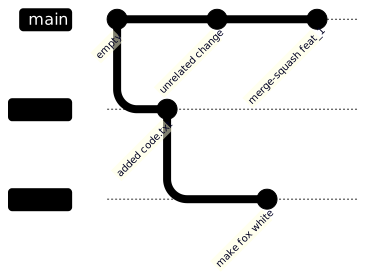
Here is the conflict:
git checkout main
git merge --squash feat_2
Auto-merging code.txt
CONFLICT (add/add): Merge conflict in code.txt
Squash commit -- not updating HEAD
Recorded preimage for 'code.txt'
Automatic merge failed; fix conflicts and then commit the result.
Squashing during merge produces a nice linear history, but squash loses the
information on what is the relation between main, feat_1 and feat_2.
Now THE TRICK that I use to avoid the conflicts: guide git explicitly that
“main now has feat_1 branch” and “feat_2 depends on main with merged
feat_1”.
Let’s restore the main and try the trick:
git restore --staged .
git checkout .
Create a temp branch out of main, merge feat_1 into temp, and then
merge temp into feat_2:
git checkout main
git checkout -b temp
git merge feat_1 -m 'merge feat_1 onto temp'
git checkout feat_2
git merge temp -m 'merge temp with main and feat_1 to feat_2'
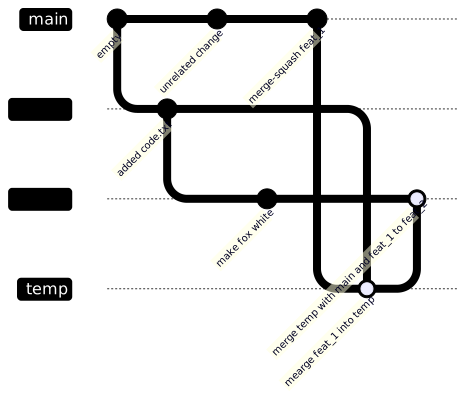
At this point feat_2 “knows” that it contains changes from main and from
feat_1, so now the merge-squash into main will pass without conflicts.
git checkout main
git merge --squash feat_2
git commit -m 'merged feat_2 to main without conflicts'
Creating a temporary temp branch seems tedious and unnecessary. If you work
with, say, GitHub, you would also have origin/main, origin/feat_1 and
origin/feat_2, and after merge-squashing feat_1 into main you could just
reuse feat_1 branch instead of creating temp.
This flow requires some practice, but it saves me lot of frustration during conflict resolution, on intensively developed, shared repositories.